 |
JM9 XRCU Tutorials 0.0.1a
Learn how to program XRCU
|
|
JM9 XRCU Tutorials 0.0.1a
Learn how to program XRCU
|
A magnetometer is a sensor that measures magnetic fields. The Earth is like a giant, weak magnet. So a magnetometer can feel which way is north, just like the needle of a compass. That is why we often call it a compass (or "electronic compass").
In this chapter, we will use the QMC5883L magnetometer with XRCU. It measures the magnetic field in 3 directions, called the X, Y and Z axes. The X and Y arrows are printed on the module.
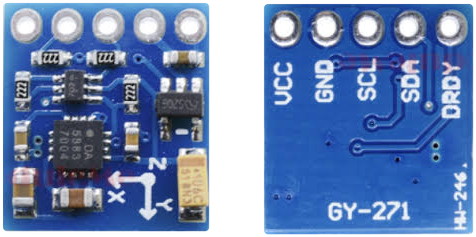
On the left is the front of the module, with the chip and the X, Y and Z arrows. On the right is the back, with the names of the pins.
The QMC5883L talks to XRCU using I2C, just like the MPU-6050 gyro. So we connect it to a T port.
The module has 5 pins: VCC, GND, SCL, SDA and DRDY. We only need the first 4:
| QMC5883L pin | Connect to XRCU |
|---|---|
| VCC | 3V3 |
| GND | GND |
| SCL | T1A |
| SDA | T1B |
Leave DRDY unconnected.
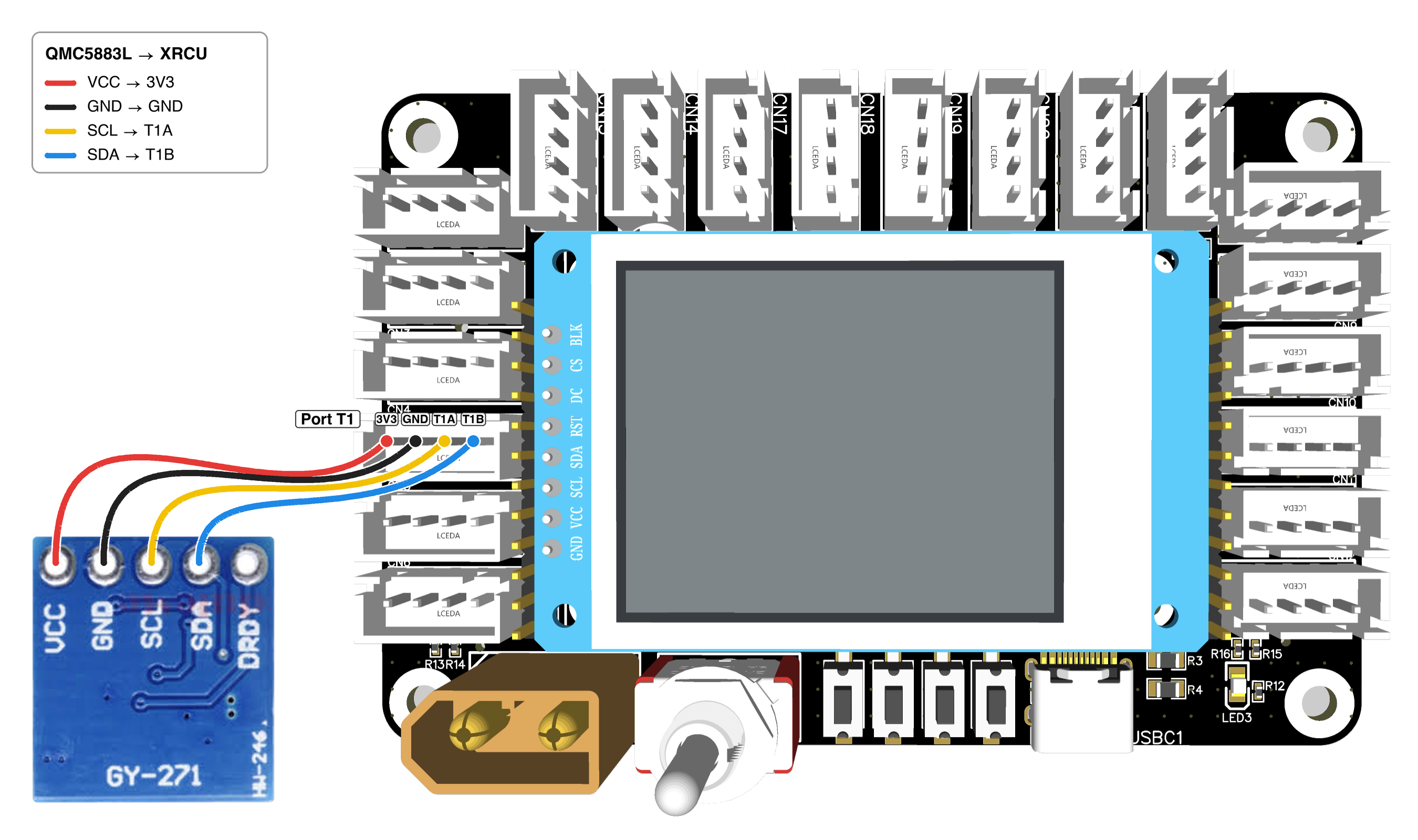
XRCU has 3 connectors called T1, and they are joined together inside XRCU. I2C lets many sensors share the same 2 wires, as long as each sensor has its own address (a number, like a house number). The QMC5883L and the MPU-6050 have different addresses. So you can plug the gyro into one T1 connector and the compass into another, and use both at the same time!
Just like the gyro, stick the module flat onto a book or a piece of cardboard, with the chip facing up.
First, include the Qmc5883l library, and create a compass on port T1:
compass.is_mag_present() gives true if XRCU finds a QMC5883L on the port. (mag is short for magnetometer.)
Turn OFF XRCU. Connect your compass module to port T1 as shown above. Turn ON XRCU, then upload the code above and run it. Open the serial monitor. Do you see Compass detected!?
If you have a gyro, turn OFF XRCU and plug it into another T1 connector too. Turn ON XRCU. Is the compass still detected?
Record a video showing the wires and the serial monitor. Submit this video to your assignment portal at checkpoint 10.1.
Let's see what the sensor really measures. We start the compass with begin() in setup(). In loop(), update() asks the sensor for a new measurement. Then we read the strength of the magnetic field along each axis:
| Code | What it gives |
|---|---|
| compass.update() | Get a new measurement from the sensor. |
| compass.get_uT_x() | Strength of the magnetic field along the X axis. |
| compass.get_uT_y() | Strength of the magnetic field along the Y axis. |
| compass.get_uT_z() | Strength of the magnetic field along the Z axis. |
The strength is measured in microtesla. In the code, we write it as uT. The Earth's magnetic field in Hong Kong is about 45 microtesla. That is very weak! A fridge magnet is hundreds of times stronger.
Upload the code above and run it. Open the serial monitor.
Record a video showing the compass, the objects and the serial monitor. Submit this video to your assignment portal at checkpoint 10.2.
In checkpoint 10.2, did the numbers go around a circle in the middle, like -40 to 40? Probably not! The circle is usually shifted, for example from 10 to 90. This is because the module, the wires and your robot have their own little bits of magnet and iron. They turn together with the compass, so they add the same shift in every direction.
Calibration finds this shift and removes it. During calibration, you turn the compass in full circles. XRCU remembers the biggest and the smallest numbers on each axis, and uses them to find the middle of the circle.
| Code | What it does |
|---|---|
| compass.compass_cal() | Calibrate. Keep turning the compass while it runs! |
| compass.save_caled_vals() | Save the calibration inside XRCU. |
Like the gyro, compass.begin() loads the saved calibration automatically every time your program starts.
compass_cal() keeps measuring while you turn the compass. It stops by itself when the numbers have not grown bigger or smaller for 5 seconds. So turn the compass slowly for 2 or 3 full circles, then hold it still and wait.
Here is a program that uses SW1 to start the calibration:
Upload the calibration program above and run it.
How long did you wait after you stopped turning?
Record a video showing the compass, the LED and the serial monitor during calibration. Submit this video to your assignment portal at checkpoint 10.3.
Heading means the way you are facing. compass.get_heading() gives the heading in degrees, from 0 to 359. It is a whole number, so we keep it in an int variable.
Heading 0 means the X arrow on the module points to magnetic north. Just like the gyro's yaw, the heading goes up when you turn the compass clockwise (to the right), and goes back to 0 after 359.
On a robot, we usually do not care where north is. We care about where the robot should face, like the opponent's goal. Just like the gyro, compass.reset_heading() makes the way the compass faces now the new zero.
There is one big difference. The compass knows where north is, so it can remember your zero even after you turn XRCU OFF! compass.save_re_zero_heading() saves your zero inside XRCU, and compass.begin() loads it every time your program starts.
Change the program above, so that clicking SW1 sets a new zero and saves it. (Hint: use button1.isClicked() from the Buttons chapter.)
Upload and run it.
Record a video showing the compass and the serial monitor during all 3 steps. Submit this video to your assignment portal at checkpoint 10.4.
Both the compass and the gyro can tell your robot which way it is facing. So which one should you use? Each one has its own strengths and weaknesses:
| Compass (magnetometer) | Gyro (gyroscope) | |
|---|---|---|
| Knows where north is | Yes | No. It starts from 0 every time. |
| Remembers the zero after you turn XRCU OFF | Yes | No. You must set the zero again. |
| Drifts slowly over time | No | Yes, a little, even after calibration. |
| Disturbed by magnets, motors and steel | Yes, a lot | No |
| Must be calibrated again in a new place | Yes | No |
| Gives the same result everywhere | No | Yes |
| Must be kept flat | Yes | No |
| Measures pitch and roll | No | Yes |
Today, most robotics competition teams use a gyro. Here is why:
So a gyro gives the same result anywhere, while a compass depends on the place. For a robot, "the same everywhere" is usually more important than "knows where north is".
This checkpoint needs the MPU-6050 gyro from the Gyroscope chapter. Make sure the gyro is calibrated first (checkpoint 9.2).
Turn OFF XRCU. Plug the compass and the gyro into 2 different T1 connectors. Stick both modules flat onto the same book, side by side.
Write a program that:
Upload and run it. Click SW1, then try these tests:
Record a video showing the book, the magnet and the serial monitor during all 3 tests. Submit this video to your assignment portal at checkpoint 10.5.
| Code | What it does |
|---|---|
| #include <Qmc5883l.h> | Lets us use Qmc5883l. |
| Qmc5883l compass(T1); | Makes a compass called compass on port T1. Write it above setup(). |
| compass.is_mag_present() | true if XRCU finds a QMC5883L, false if not. |
| compass.begin() | Starts the compass, with the saved calibration and zero. Call it in setup(). |
| compass.update() | Gets a new measurement for get_uT_x(), get_uT_y() and get_uT_z(). |
| compass.get_uT_x() | Field strength along the X axis, in microtesla. Also get_uT_y() and get_uT_z(). |
| compass.compass_cal() | Calibrates. Turn the compass in full circles, then hold it still. |
| compass.save_caled_vals() | Saves the calibration inside XRCU. |
| compass.get_heading() | Heading in degrees, from 0 to 359. Turning right makes it go up. |
| compass.reset_heading() | Makes the way the compass faces now the new zero. |
| compass.save_re_zero_heading() | Saves the zero inside XRCU. Only call it when a button is clicked! |
Remember:
 1.18.0