 |
JM9 XRCU Tutorials 0.0.1a
Learn how to program XRCU
|
|
JM9 XRCU Tutorials 0.0.1a
Learn how to program XRCU
|
A gyroscope (or "gyro" for short) is a sensor that knows how it is turning. With a gyro, a robot knows which way it is facing, even when it cannot see anything. Your phone has one too: that is how it knows when you turn it sideways!
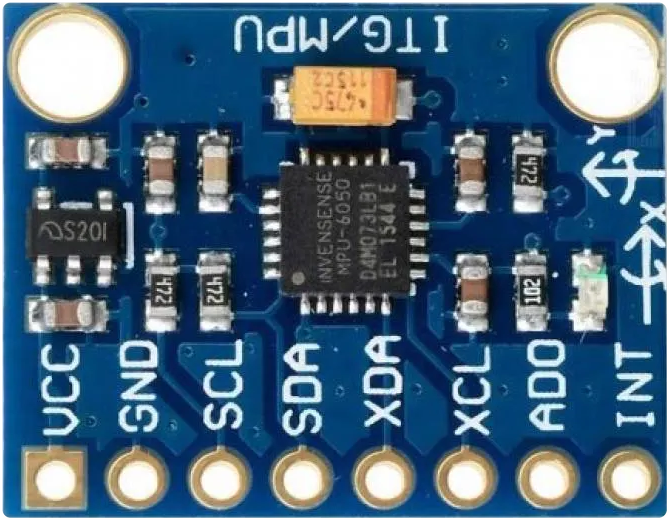
In this chapter, we will use the MPU-6050 with XRCU. The MPU-6050 is a small chip with 2 sensors inside:
It also has a tiny computer inside, which mixes the 2 sensors together and works out the angles for us.
We use 3 angles to describe which way something is facing. Imagine you are sitting in an aeroplane:
| Angle | The plane... | Example on a robot |
|---|---|---|
| Yaw | turns left or right | the robot turns on the floor |
| Pitch | points its nose up or down | the robot drives up a ramp |
| Roll | tips one wing up and the other down | one wheel of the robot drives over a bump |
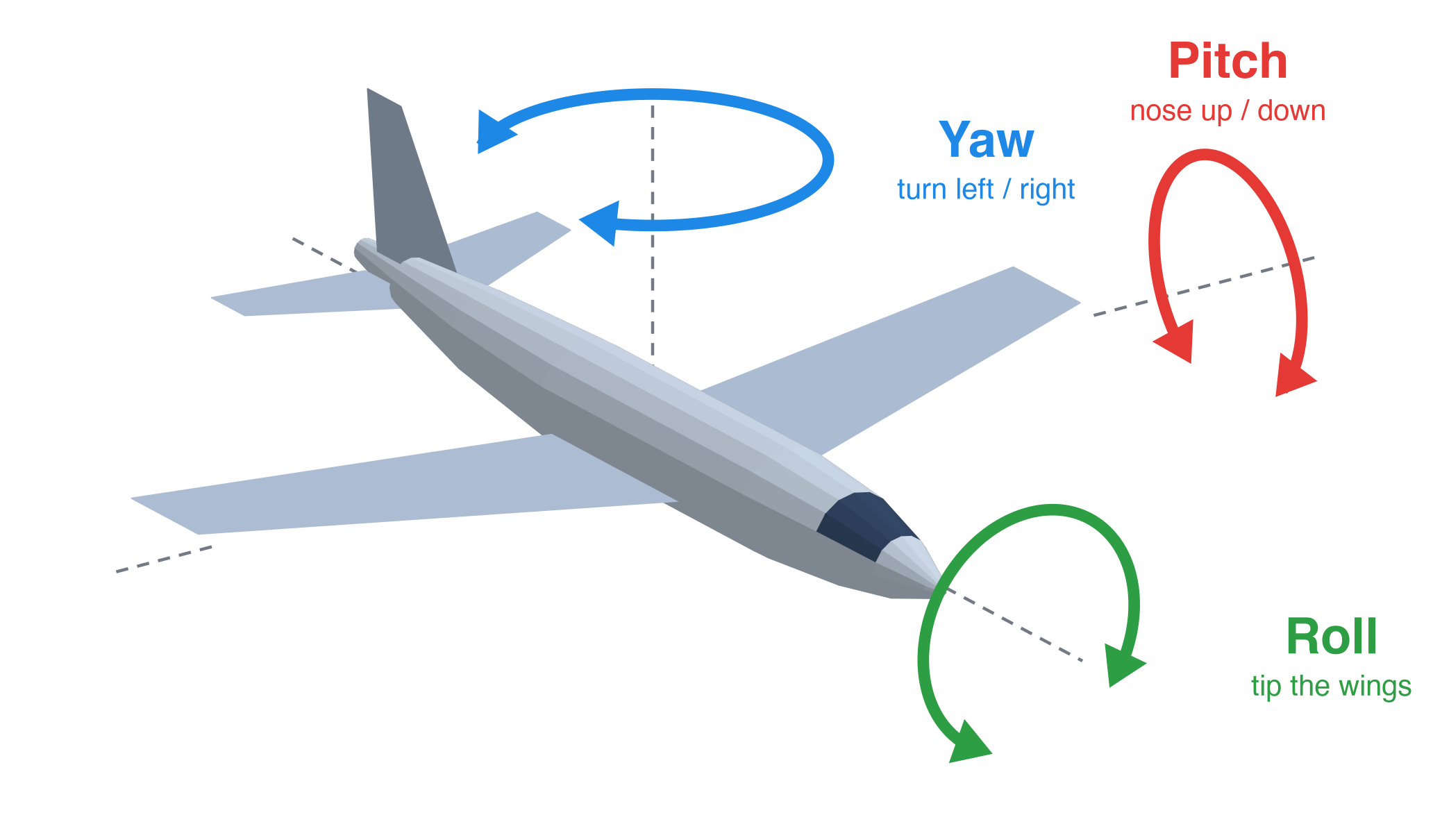
Robots on the floor mostly care about yaw, because yaw tells the robot which way it is facing.
The MPU-6050 talks to XRCU using I2C (say "I-squared-C"). I2C is a way for chips to talk to each other using only 2 wires:
On XRCU, the I2C ports are the T ports: T1 and T2.
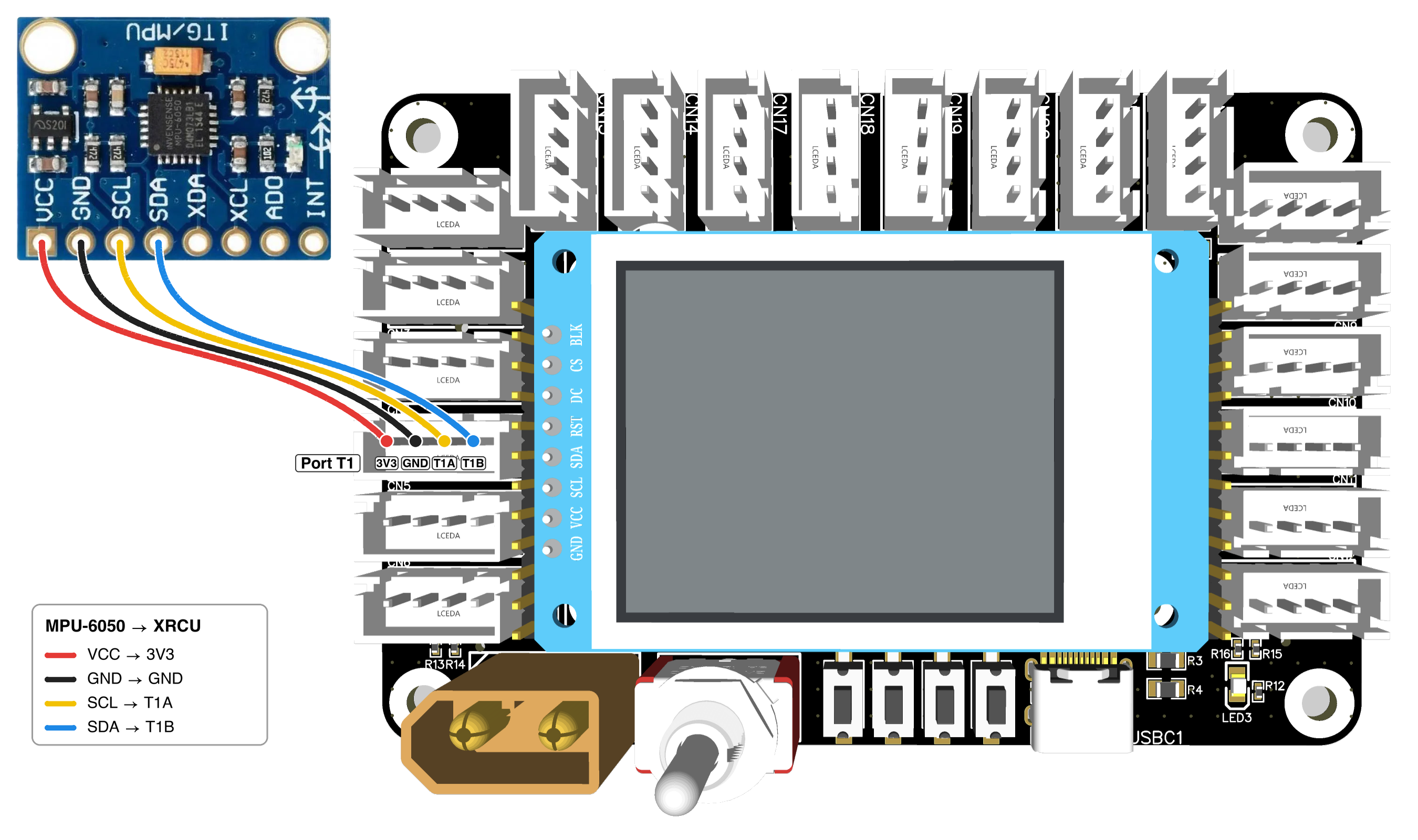
Most MPU-6050 modules have 8 pins: VCC, GND, SCL, SDA, XDA, XCL, AD0 and INT. We only need the first 4. Use 4 jumper wires to connect the module to port T1:
| MPU-6050 pin | Connect to XRCU |
|---|---|
| VCC | 3V3 |
| GND | GND |
| SCL | T1A |
| SDA | T1B |
Leave XDA, XCL, AD0 and INT unconnected.
The gyro measures the turning of the module, not of XRCU. So the module must not wobble on its wires. Stick the module onto a book or a piece of cardboard with some tape, with the chip facing up. Then you can turn the book to turn the gyro. On a real robot, the module is screwed flat onto the robot.
First, include the Mpu_6050_dmp library at the top of your program:
(dmp is short for Digital Motion Processor: the tiny computer inside the MPU-6050 that works out the angles for us.)
Next, we create a gyro in our code, and tell it which port it uses:
This line means: "make a new Mpu_6050_dmp gyro called gyro, on port T1". Just like Uts_gpio in the Ultrasonic Sensors chapter, write it above setup(), so that both setup() and loop() can use it.
Before we use the gyro, let's check that XRCU can find it. gyro.is_gyro_present() gives true if XRCU can talk to the gyro, and false if it cannot.
Turn OFF XRCU. Connect your MPU-6050 to port T1 as shown above. Turn ON XRCU, then upload the code above and run it. Open the serial monitor. Do you see Gyro detected!?
Next, turn OFF XRCU and swap the SCL and SDA wires. Turn ON XRCU again. What does the serial monitor show now? Finally, turn OFF XRCU and connect the wires correctly again.
Record a video showing the wires and the serial monitor, for both the correct and the swapped wiring. Submit this video to your assignment portal at checkpoint 9.1.
Every MPU-6050 is a little bit different. Even when it is perfectly still, it may think it is turning a tiny bit, or that it is tilted a tiny bit. These tiny errors add up very quickly, so yaw, pitch and roll all slowly move away from the true angles. This is called drift.
To fix this, we must calibrate the gyro before we read any angles. You have seen calibration before in the Analog Inputs chapter. During gyro calibration, XRCU measures the small errors of your gyro while it is perfectly still, so it can cancel them out later.
First, we start the gyro with begin() inside setup(). Then there are 2 functions for calibration:
| Code | What it does |
|---|---|
| gyro.cal() | Measure the errors of the gyro. The gyro must be flat and still! |
| gyro.save_caled_vals() | Save the calibration inside XRCU. (caled is short for "calibrated".) |
After you save the calibration, gyro.begin() loads it automatically every time your program starts, even after you turn XRCU OFF. So you only need to calibrate once.
Here is a program that uses SW1 to start the calibration:
During calibration, you may see some strange symbols in the serial monitor, like >.....>...... These come from the library, and show that the calibration is working.
Upload the calibration program above and run it.
How long does the calibration take? Why do you think the program waits 2 seconds after you click SW1?
Record a video showing the gyro, the LED and the serial monitor during calibration. Submit this video to your assignment portal at checkpoint 9.2.
Now that the gyro is calibrated, we can read the 3 angles in degrees:
| Code | What it gives |
|---|---|
| gyro.get_yaw() | Yaw, from 0 to 359.99 degrees. |
| gyro.get_pitch() | Pitch, 0 when the module is flat. |
| gyro.get_roll() | Roll, 0 when the module is flat. |
The angles are numbers with decimal places, like 90.25. So we keep them in float variables.
This program has no calibration code. gyro.begin() loads the calibration you saved in checkpoint 9.2.
Keep the gyro still for a few seconds after you turn ON XRCU. The gyro needs this short time to settle down.
When the program starts, the yaw is about 0. So yaw does not tell you where north is. It tells you how far the gyro has turned since it started.
With the chip facing up, look down at the gyro from above:
Yaw is just like a compass: after 359.99 degrees, it goes back to 0.
Upload the code above and run it. Open the serial monitor with timestamps.
Record a video showing the gyro and the serial monitor during steps 1 and 2. Then take a screenshot of the serial monitor at the start and at the end of step 3. Submit the video and both screenshots to your assignment portal at checkpoint 9.3.
When a robot starts a game, it is usually facing the right way. So we want the yaw to be 0 when the robot faces forwards.
gyro.reset_heading() makes the way the gyro is facing now the new zero. (Heading means the way you are facing.) After that, get_yaw() measures from this new zero.
Change your program from checkpoint 9.3, so that:
(Hint: 10 degrees to the right is a yaw of 10. What is the yaw when the gyro faces 10 degrees to the left? In an if, || means "or".)
Upload and run it. Turn the gyro a little bit, then click SW1. Is the LED ON? Now turn the gyro slowly to the left and to the right. When does the LED turn OFF?
Record a video showing the gyro, the LED and the serial monitor. Submit this video to your assignment portal at checkpoint 9.4.
Imagine your robot should face its zero, but it now has a yaw of 350. Should it turn left or right?
350 degrees to the right is the same as 10 degrees to the left. Turning 10 degrees is much quicker than turning 350 degrees! So it is easier to think of the yaw as a number from -180 to 180:
To change the yaw from "0 to 359.99" into "-180 to 180", we subtract 360 when the yaw is bigger than 180:
For example, a yaw of 350 becomes 350 - 360 = -10, which means "10 degrees to the left". We call this number the error: how far we are from where we want to face.
| get_yaw() | error | Meaning |
|---|---|---|
| 0 | 0 | Facing zero. |
| 30 | 30 | 30 degrees to the right. Turn left! |
| 180 | 180 | Facing backwards. |
| 270 | -90 | 90 degrees to the left. Turn right! |
| 350 | -10 | 10 degrees to the left. Turn right! |
Write a program that clicks SW1 to set a new zero (like checkpoint 9.4), and prints:
Print the error on the same line too.
Upload and run it. Click SW1, then turn the gyro to the left and to the right. Does it always tell you the shorter way back to zero? What happens when the gyro faces exactly backwards?
Record a video showing the gyro and the serial monitor. Submit this video to your assignment portal at checkpoint 9.5.
| Code | What it does |
|---|---|
| #include <Mpu_6050_dmp.h> | Lets us use Mpu_6050_dmp. |
| Mpu_6050_dmp gyro(T1); | Makes a gyro called gyro on port T1. Write it above setup(). |
| gyro.is_gyro_present() | true if XRCU can talk to the gyro, false if not. |
| gyro.begin() | Starts the gyro, with the saved calibration. Call it in setup(). |
| gyro.get_yaw() | Yaw in degrees, from 0 to 359.99. Turning right makes it go up. |
| gyro.get_pitch() | Pitch in degrees, 0 when flat. |
| gyro.get_roll() | Roll in degrees, 0 when flat. |
| gyro.reset_heading() | Makes the way the gyro faces now the new zero yaw. |
| gyro.cal() | Measures the errors of the gyro. Keep it flat and still! |
| gyro.save_caled_vals() | Saves the calibration inside XRCU. |
Remember:
 1.18.0