 |
JM9 XRCU Tutorials 0.0.1a
Learn how to program XRCU
|
|
JM9 XRCU Tutorials 0.0.1a
Learn how to program XRCU
|
In RoboCup Junior (RCJ) Soccer, robots play football with a special ball. The ball has small lights inside that flash infrared (IR) light very quickly. Infrared light is a kind of light that our eyes cannot see, but some sensors can. So a robot can find the ball by looking for this flashing IR light.
In this chapter, we will use the Compound Eye module (JM9-PSA-17074) with XRCU. A fly has a compound eye: one big eye made of many small eyes, each looking in a slightly different direction. Our module works the same way. It is a half circle with 7 small eyes around its edge. Each eye looks in a different direction, 30 degrees apart. A tiny computer on the module compares the 7 eyes, and works out where the ball is and how strong its light is.
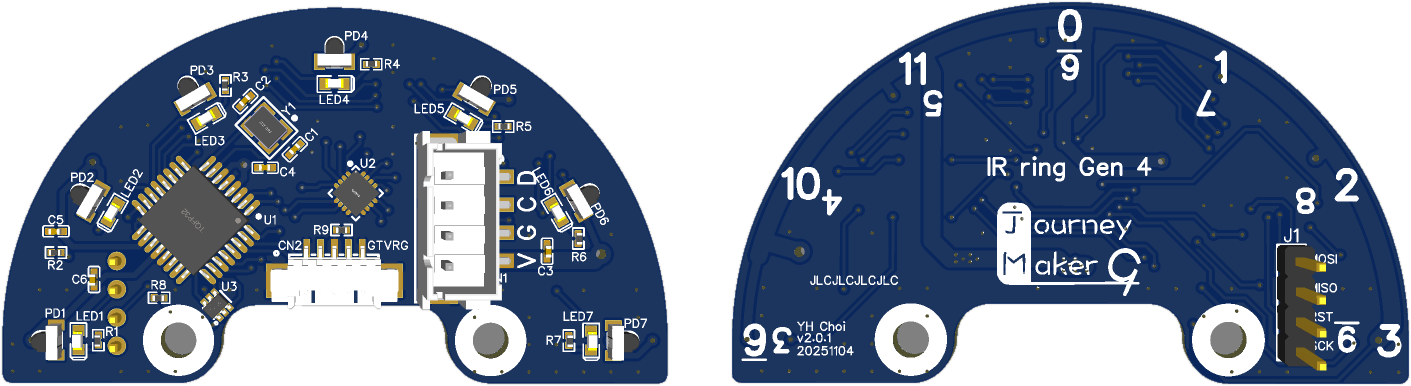
On the left is the front of the module. The 7 small black parts at the edge are the eyes (PD1 to PD7). Next to each eye there is a green LED. The LED next to the eye that sees the ball best lights up, so you can see the ball direction without any code. On the right is the back of the module, with the numbers 0 to 11, like a clock. We will use these numbers at the end of this chapter.
The compound eye talks to XRCU using I2C, just like the gyro and the compass. So we connect it to a T port.
The module has a white 4-pin connector called CN1. Its pins are marked V, G, C and D on the module. Use a 4-wire cable with a white plug that fits CN1 on one end, and jumper-wire ends on the other end:
| Compound eye pin | Connect to XRCU |
|---|---|
| V (VCC) | 3V3 |
| G (GND) | GND |
| C (SCL, clock) | T1A |
| D (SDA, data) | T1B |
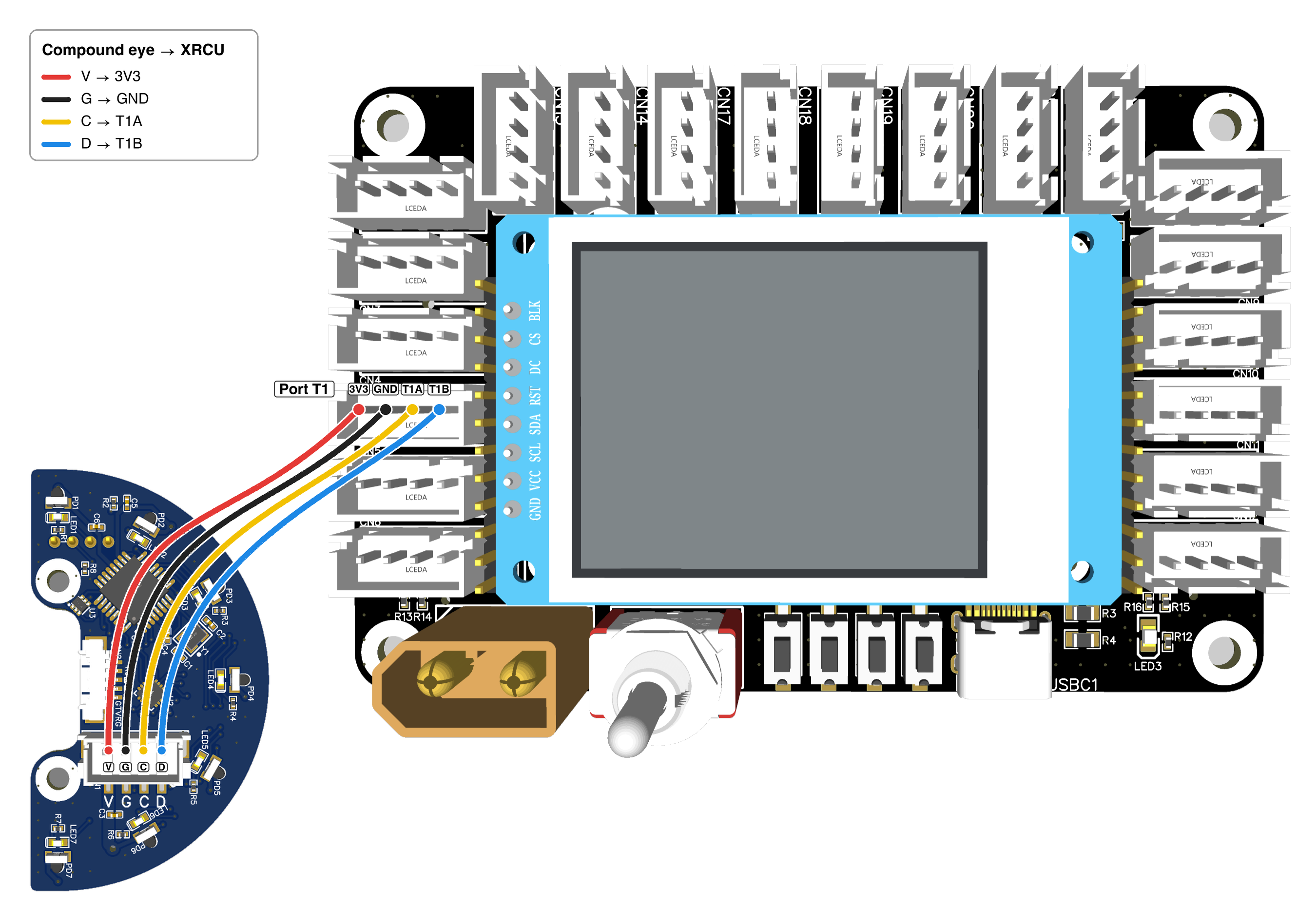
The picture shows the parts side of the module, so that you can see the pins. When you use the module, the numbered side faces up (see below).
The module has 2 other connectors. The small 5-pin connector CN2 is used to join 2 compound eyes together. We will use it later in this chapter. The row of 4 metal pins on the back (J1) is only for the factory. Do not connect anything to it.
Put the module flat on the table, with the numbers facing up. Turn it so that the round edge points away from you, and the flat edge is near you. Now the module "looks" forwards, just like you:
We count the eyes from left to right: eye 1 is the leftmost eye, eye 4 looks to the front, and eye 7 is the rightmost eye.
With the numbers facing up, the green LEDs face down to the table. This is on purpose: the board blocks light coming from above, like a cap. You can still see the LED light on the table, or you can look from the side.
Stick the module onto a small box or a book with some tape, so that it does not move when you pull the wires. Put the ball on the same table, so that the ball is at the same height as the eyes.
First, include the CompoI library, and create a compound eye on port T1:
Then we start the compound eye with eye.begin() in setup(). eye.test_comm() gives true if XRCU can talk to the compound eye, and false if it cannot. (comm is short for communication.)
Turn OFF XRCU. Connect your compound eye to port T1 as shown above. Turn ON XRCU, then upload the code above and run it. Open the serial monitor. Do you see Compound eye detected!?
Next, turn ON the IR ball, and move it slowly around the module. Watch the green LEDs. Does the light follow the ball?
Record a video showing the wires, the serial monitor and the LEDs following the ball. Submit this video to your assignment portal at checkpoint 13.1.
When the ball is in front of the module, all 7 eyes see some of its light. The eye that points straight at the ball sees the most light. We call it the strongest eye.
| Code | What it gives |
|---|---|
| eye.get_max_idx() | The number of the strongest eye, from 1 (left) to 7 (right). |
| eye.get_max_val() | How much IR light the strongest eye sees, from 0 to 255. |
(max is short for maximum, the biggest. idx is short for index, which means "the number in a list". val is short for value.)
We call get_max_val() the strength of the ball. When the ball is close, the strength is big. When the ball is far away, the strength is small.
The compound eye only looks for flashing IR light, like the light of the ball. Sunlight and room lights do not flash like this, so the module ignores them. When there is no ball, the strength stays low. It is not exactly 0: there is always a little bit of noise, so it moves up and down a little.
Upload the code above and run it. Turn ON the IR ball.
Record a video showing the ball and the serial monitor during steps 1 to 4. Submit this video to your assignment portal at checkpoint 13.2.
The strongest eye tells us the direction of the ball, but only in steps of 30 degrees. The module can do better. It also compares the strongest eye with the 2 eyes next to it. If the left neighbour sees more light than the right neighbour, the ball must be a little bit to the left of the strongest eye.
eye.get_ball_angle() gives the direction of the ball in degrees, from 0 to 180:
| Ball angle | Where is the ball? |
|---|---|
| 0 | Left (eye 1) |
| 45 | Front-left |
| 90 | Front (eye 4) |
| 135 | Front-right |
| 180 | Right (eye 7) |
The ball angle goes up from left to right (clockwise), just like the gyro's yaw. Each eye looks 30 degrees further to the right than the eye before it.
To steer a robot, it is easier to use an error, like in the Gyroscope chapter. We want the ball in front, at 90 degrees. So we subtract 90:
When there is no ball, the ball angle is meaningless. The module follows the tiniest bit of noise, so the angle jumps around a lot, to any number. So always check the strength first. Choose a small "no ball" number, a little bigger than the noisy strength you measured with no ball. If the strength is smaller than this number, there is no ball, and you must ignore the angle.
In C++, else if means "otherwise, if ...". It lets us check many cases one after another. Only the first case that is true runs:
Write a program that prints, on each line:
Also, turn LED_BUILTIN ON when the ball is close (closer than about 10 cm). Use your strength numbers from checkpoint 13.2 to choose how big the strength must be. Remember pinMode(LED_BUILTIN, OUTPUT); in setup().
Upload and run it. Move the ball around in front of the module, then take it far away. Does your program always tell the right side? Is the error 0 when the ball is exactly in front?
Record a video showing the ball, the LED and the serial monitor. Submit this video to your assignment portal at checkpoint 13.3.
The compound eye looks for flashing IR light. But the ball is not the only thing that flashes IR light:
These make the readings jump to wrong numbers. They do not break the module. The numbers become correct again when the light stops.
If your readings jump around strangely, first look for these things nearby. To check whether your module is broken, put another compound eye at the same place. If the other module jumps too, the problem is around you, not in your module.
One compound eye sees only the half circle in front of it. In checkpoint 13.2, you saw that it cannot find a ball behind it. But in a soccer game, the ball can be anywhere!
So we join 2 compound eyes to make a full circle:
Module B gets its power through the 5-pin cable. The 2 modules also talk to each other through this cable, using UART (a way for 2 chips to send data to each other). The cable joins the TX (send) pin of each module to the RX (receive) pin of the other module. So module B sends what it sees to module A. Module A puts the readings of all 12 directions together and works out the ball angle all around. Do not connect module B to XRCU.
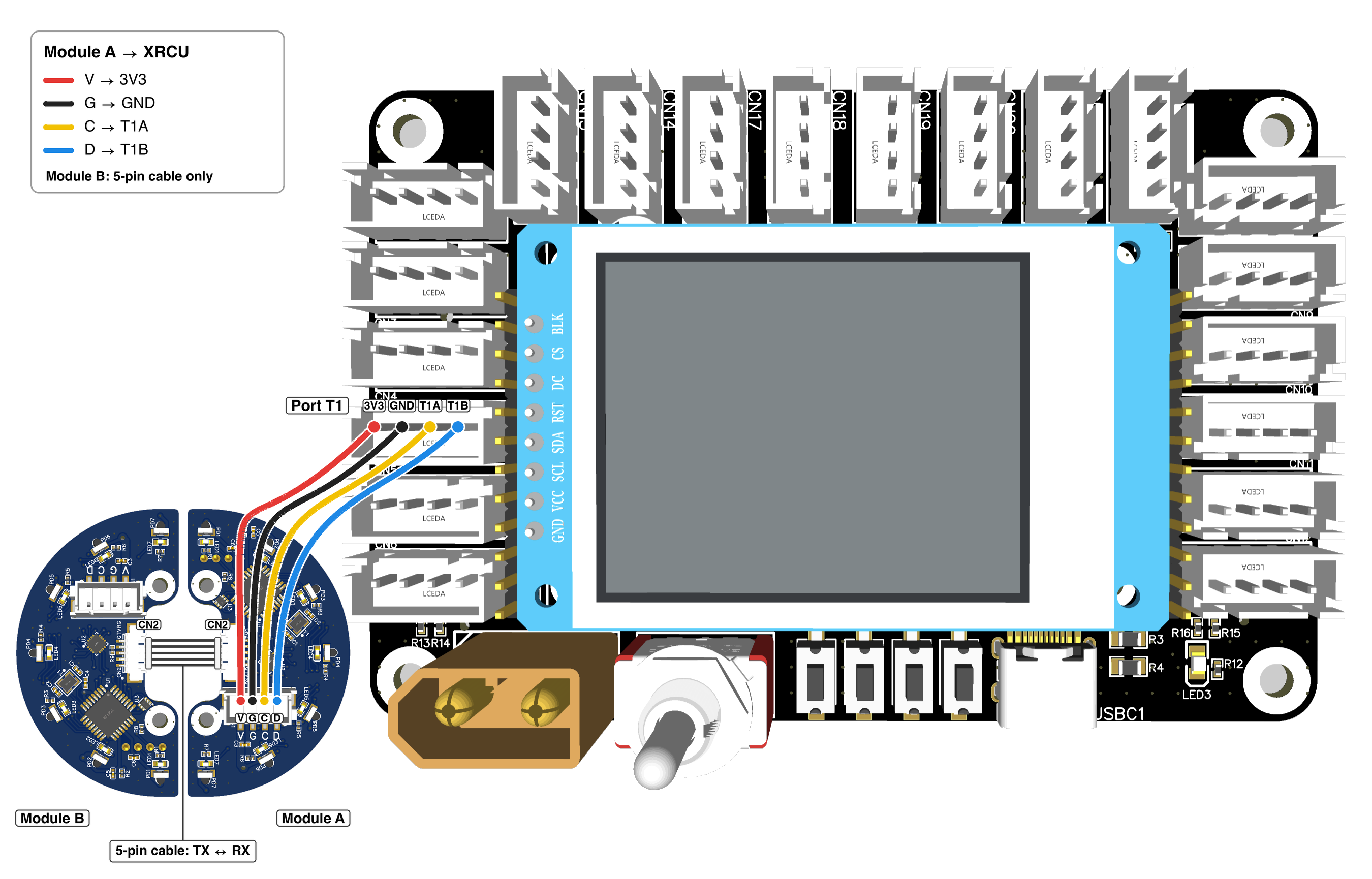
Again, the picture shows the parts side, so that you can see the pins. When you use the modules, turn the whole circle over, so that the numbers face up.
Joining modules one after another with a cable like this is called a daisy chain, like a chain of flowers.
Now look at the numbers on the back of the 2 modules. Turn the circle so that module A is at the top (in front), and read the numbers that are the right way up. They go around the circle from 0 to 11, like the hours on a clock:
(Each eye has a second, upside-down number. That number is used when the other module is connected to XRCU instead.)
The numbers are 30 degrees apart. So the direction in degrees is the clock number times 30: 3 is 90 degrees, 6 is 180 degrees, and 9 is 270 degrees.
For the full circle, we use these 2 functions:
| Code | What it gives |
|---|---|
| eye.get_ball_angle_360() | The ball angle all around, from 0 to 359 degrees. 0 is the front of module A. It goes up clockwise. |
| eye.get_max_val_360() | The strength of the ball all around, from 0 to 1023. |
The full-circle ball angle starts at the front, just like the gyro's yaw and the compass heading. This is different from get_ball_angle(), which starts at the left.
The full-circle strength goes up to 1023, not 255. So your "no ball" number and your "close" number will be different here. Measure them again!
We usually check that XRCU can talk to module A before we start. This while loop waits in setup() until the compound eye is found:
Turn OFF XRCU. Join 2 compound eyes with the 5-pin cable, and connect module A to port T1, as shown above. Stick both modules onto the same book or box, as a full circle. Turn ON XRCU, then upload the code above and run it.
Record a video showing the ball, the clock numbers and the serial monitor during steps 1 to 4. Submit this video to your assignment portal at checkpoint 13.4.
A soccer robot must turn towards the ball, the shorter way. This is just like the "Which Way to Turn?" problem in the Gyroscope chapter. If the ball angle is 350, the ball is only 10 degrees to the left.
So we change the angle from "0 to 359" into an error from -180 to 180, in the same way as the gyro:
| get_ball_angle_360() | error | Where is the ball? |
|---|---|---|
| 0 | 0 | Straight in front. |
| 60 | 60 | Front-right. Turn right! |
| 180 | 180 | Straight behind. |
| 270 | -90 | On the left. Turn left! |
| 350 | -10 | A little to the left. Turn left! |
Write a program for the 2 compound eyes that prints, on each line:
Also, turn LED_BUILTIN ON when the ball is closer than about 10 cm.
(Hint: use else if from checkpoint 13.3. The order of your ifs matters: check No ball first, then Behind. In an if, || means "or".)
Upload and run it. Move the ball all around the circle, near and far. Does your program always tell you the shorter way to turn? Why should a robot check Behind before Turn left and Turn right?
Record a video showing the ball, the LED and the serial monitor. Submit this video to your assignment portal at checkpoint 13.5.
| Code | What it does |
|---|---|
| #include <CompoI.h> | Lets us use CompoI. |
| CompoI eye(T1); | Makes a compound eye called eye on port T1. Write it above setup(). |
| eye.begin() | Starts the compound eye. Call it in setup(). |
| eye.test_comm() | true if XRCU can talk to the compound eye, false if not. |
| eye.get_max_idx() | The strongest eye, from 1 (left) to 7 (right). |
| eye.get_max_val() | The strength of the ball for 1 module, from 0 to 255. Bigger means closer. |
| eye.get_ball_angle() | The ball angle for 1 module, from 0 (left) through 90 (front) to 180 (right). |
| eye.get_ball_angle_360() | The ball angle for 2 modules, from 0 to 359. 0 is the front of module A. Goes up clockwise. |
| eye.get_max_val_360() | The strength of the ball for 2 modules, from 0 to 1023. |
Remember:
 1.18.0